March 2026 – Release Notes
Welcome to the March 2026 release of Qalyptus Self-hosted (version 10.0). This is a major release that brings a redesigned Qalyptus Server experience, significant new features, performance improvements, and important breaking changes.
Version 10 is a major release with breaking changes. Please read the Breaking Changes and How to Upgrade sections carefully before proceeding.
New Features
Redesigned Qalyptus Server UI
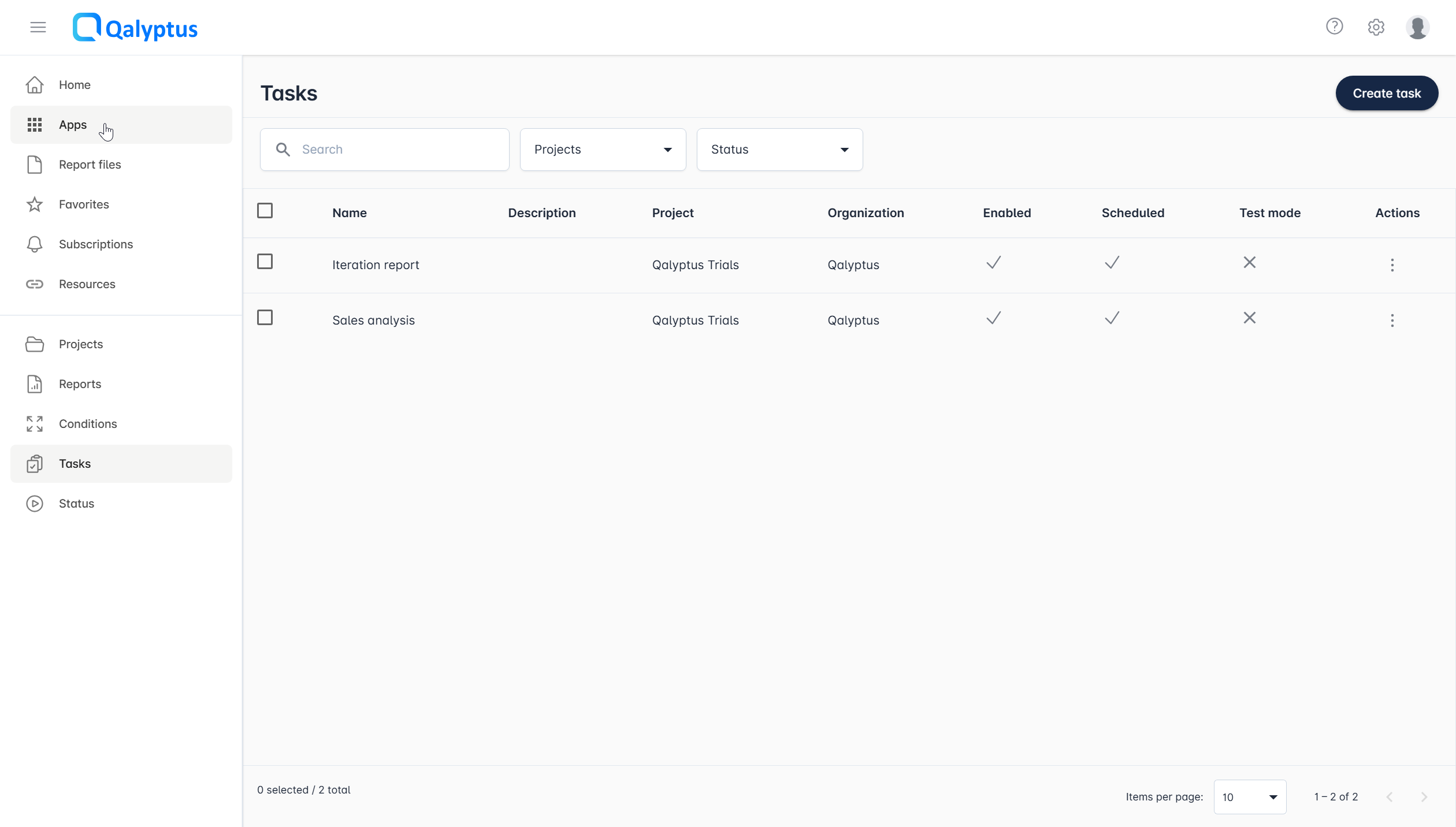
Version 10 introduces a refreshed user interface for Qalyptus Server:
- The top navigation bar has been replaced by a left-side menu that consolidates Hub items and creation settings in a single, unified panel.
- Creating and editing elements now uses a slide-in drawer instead of full-page forms, keeping context visible while you work.
- The email message editor in tasks has been improved for a better authoring experience.
New Qalyptus Server interface
See the new experience in video
Simplified destination management
Previously, folders and storage service destinations had to be configured on a separate Destinations page and were shared across all task reports. Starting with this version, folders and storage services are configured directly on each task report, allowing you to specify a different output destination per report within the same task. The standalone Destinations page has been removed.
Simplified trigger management
Triggers were previously created on a dedicated Triggers page and then referenced in tasks. They are now created directly inside the task where they are used. The standalone Triggers page has been removed.
Per-report Publish to Hub settings
The "Publish to Hub" option has moved from the task level to the individual report level. You can now configure Hub publishing, including the number of occurrences to retain, separately for each report in a task.
Per-report conditions
Conditions are now attached directly to the report you want to conditionally generate, instead of being configured at the task level. This makes it clearer which report a condition applies to and removes the need to specify scope manually.
First name and last name fields
Qalyptus now stores user first name and last name as separate fields instead of a single full name.
After upgrading, verify that your users' names have been correctly split. Qalyptus migrates existing full names by splitting on the first space character. Users with names that don't follow a "Firstname Lastname" pattern may need manual correction.
Automatic propagation of reports
This release introduces Automatic propagation of a report, designed for multi-tenant deployments where a single report template built on a Qlik Sense Master app needs to be distributed across many duplicate app instances (typically 100+). Using the API, you can duplicate a task and dynamically substitute the Qlik Sense application references at runtime; without creating separate reports for each customer app.
Learn more about automatic propagation.
Separated Server and Engine services
Qalyptus Server now runs as two independent services alongside the existing Repository service:
- Qalyptus Server service - handles the web console and API.
- Qalyptus Engine service - handles report generation, now fully decoupled from the console.
Separating the engine is the foundation for future capabilities such as running the engine on a dedicated machine or scaling with multiple engines for high-volume report generation. The Engine service listens on port 3995 by default and writes to its own dedicated log file.
API keys
Users can now generate personal API keys directly from their user profile to authenticate with the Qalyptus REST API.
Administrators control this feature from the administration panel: they can enable or disable API key generation and set the maximum allowed key duration. Learn more about API key administration.
API key permissions are governed by the user's assigned roles.
Three new default roles
Three new built-in roles have been added, each pre-configured with the permissions required to use the corresponding Qlik Sense extension:
| Role | Purpose |
|---|---|
| Qalyptus On-Demand | Use the Qalyptus On-Demand extension |
| Qalyptus Self-Reporting | Use the Qalyptus Self-Reporting extension |
| Qalyptus Notify | Use the Qalyptus Notify extension |
The former permission "Use API, Qalyptus On-Demand and Qalyptus Self-Reporting" has been renamed to "Use Qalyptus API" and now solely controls the ability to generate and use API keys. Extension access is managed through the new extension roles or a custom role.
Performance Improvements
Improved paging and filtering
All lists in Qalyptus Server are now retrieved with server-side paging, significantly improving performance on large datasets. The filtering experience has also been overhauled:
- Filters are linked to paging, so results update correctly as you page through data.
- Filter state is persisted when you navigate away to edit an element and return, and also when you refresh the page.
- Multiple filter criteria are combined to return a single, accurate result set.
Upgrade to PostgreSQL 18
The Qalyptus Server database has been upgraded from PostgreSQL 10 to PostgreSQL 18, delivering substantial performance and reliability improvements.
Consolidated data folder
All application data (logs, backups, database files, etc.) is now stored in a single configurable folder, making it easier to manage storage locations and perform backups. The default path is:
C:\Program Files\Qalyptus\Server\Data
Qlik Sense Extensions Updated
Paging and filtering have been added to all three Qlik Sense extensions: Qalyptus On-Demand, Qalyptus Self-Reporting, and Qalyptus Notify.
After upgrading Qalyptus Server, install the updated extension versions. The new extension files are located at:
C:\ProgramData\Qalyptus\Server\Extensions
API Improvements
- The REST API v1 is deprecated and no longer available in version 10. All integrations must migrate to the v2 API.
- API v2 now supports filter parameters on list endpoints.
- API v2 now supports paging on all list endpoints.
Added a new Config.ini setting
The new version adds a new Config.ini setting: deleteIfTooManyQlikSessions=true/false. When set to true (the default), Qalyptus automatically closes a user's open Qlik sessions when the count reaches 5 or more. Set to false to disable this behavior.
Breaking Changes
Review all breaking changes before upgrading. Some changes require manual action and cannot be automatically migrated.
REST API v1 removed
The v1 REST API is no longer available. You must update all integrations to use the v2 API, adapting endpoint paths, request bodies, responses, and paging accordingly.
Use the new API key feature to authenticate your API calls instead of any previous authentication mechanism.
Database schema changes
The database schema has been updated. If you have custom SQL scripts that query the Qalyptus database directly, you must update them to match the new schema.
Qalyptus strongly recommends using the REST API rather than direct database queries. Only the REST API guarantees long-term schema stability.
Extensions must be updated
The Qlik Sense extensions use the v2 API and must be updated after upgrading Qalyptus Server. Install the new extension versions from C:\ProgramData\Qalyptus\Server\Extensions.
Qalyptus Desktop project file format changed
The Qalyptus Desktop project file format (.qtr) has changed from XML to JSON. Project files created with version 10 cannot be opened with earlier versions of Qalyptus Desktop.
End of support for Windows Server 2012 R2
Support for Windows Server 2012 R2 has ended because Microsoft ended support for this operating system in October 2023. We recommend using a newer supported Windows Server version.
Bug Fixes and Improvements
- Fixed an issue where connecting Qalyptus Desktop to Qalyptus Server would sometimes leave the listener unresponsive. Previously, this required signing out of the Windows session before retrying. The connection process now recovers correctly.
- Added the ability to cancel an in-progress connection when connecting Qalyptus Desktop to Qalyptus Server.
- Updated outdated third-party libraries.
- Internal architecture modernization to improve maintainability and enable faster feature development.
- Fixed known vulnerabilities in third-party dependencies, including PostgreSQL and other libraries.
How to Upgrade
Version 10 can only be installed as an upgrade from version 9.6.x. If your current version is earlier than 9.6.x, first upgrade to the latest 9.6.x release by following the How to upgrade Qalyptus guide, then return here to upgrade to 10.
Upgrade steps
- Download the Qalyptus 10.x installer.
- Run the installer (the process is the same as a standard upgrade).
- At the end of the installation, leave the "Launch Qalyptus Server Configuration" option checked.
- In the configuration tool:
- Enter the Qalyptus services user password and click Next.
- Click Install and wait for the migration to complete.
- Open Qalyptus Server in your browser and log in.
- Install the updated Qlik Sense extensions from
C:\ProgramData\Qalyptus\Server\Extensionsin your Qlik Sense environment. - Update any existing API integrations to use the v2 endpoints. Adapt endpoint paths, request bodies, responses, and add paging support where needed. See the API documentation for the full v2 reference.
Post-upgrade verification checklist
After upgrading, verify the following to ensure a successful migration:
- User first names and last names are correctly split (check users with non-standard name formats).
- Destinations and storage services are correctly associated with the appropriate task reports.
- Triggers are correctly migrated into their respective tasks.
- "Publish to Hub" settings are correctly migrated to the report level in each task.
- User permissions and roles are as expected, including the new extension roles.
- Any API integrations have been updated to use v2 endpoints.
- Custom SQL scripts have been updated for the new database schema.
- Updated Qlik Sense extensions are installed.
The upgrade will fail if the installer detects a version earlier than 9.0, or if you attempt to install into a different folder than the existing installation.
If you encounter any issues after upgrading, please contact the Qalyptus support team.
As always, your feedback is welcome and helps us continue to improve Qalyptus.